
CONTROL Resonant Wallpapers
Last updated 2026-09-27 · Verified against Official wallpaper hub and Remedy Launch/Gamescom media kits · 3 min read
Where can I download Control Resonant wallpapers?
On this page
Quick Facts
Quick Facts
- Gallery
- 41 images — 26 landscape at 3840x2160 (4K) plus 15 portrait phone versions; PNG and JPG
- Where
- controlgame.com → MEDIA > WALLPAPERS, with direct download links[1]
- Phone variants
- Official set has none (landscape-only); portrait versions for iPhone and Android are provided on this page[1]
- Cost & license
- Free for personal desktop use; © Remedy Entertainment[1]
- First posted
- December 12, 2025 — two different wallpapers on @remedygames and @ControlRemedy[3]
- English site
- controlgame.com/en — the site redirects by browser language[2]
- Previous game
- Control (2019) 'Wallpaper Wednesday' albums (2018–2019) are a separate, older set
Jump to: Original 13 · New screenshots · Phone wallpapers · Official art · How to download
All 13 official wallpapers (4K)
- Paranatural combat
- Fire and destruction
- The Aberrant in action
- Manhattan street encounter
- A warped Manhattan district
- The doorway
- Paranatural encounter
- Red-lit combat
- Creature encounter
- The shattered head
- Impossible architecture
- key art
- Manhattan key art
The complete set is 3840x2160 (4K UHD) JPGs released by Remedy. Browsing uses lightweight previews for speed, while opening any image in the HD viewer lets you zoom, switch slides, or choose Download original to save the original 4K file without additional recompression.
The artwork first debuted on December 12, 2025, announced via @remedygames and @ControlRemedy. All files are hosted on the permanent official media hub on controlgame.com. The news page tracks future official art drops as they happen.
Launch and Gamescom screenshots (4K)
13 additional official screenshots from Remedy’s Launch and Gamescom media kits. All are 3840x2160; the original PNG or JPG is preserved. The two PS5 images are labeled HUD visible because they include gameplay interface elements.
- Inverted Manhattan skyline
- Floating rubble spheres
- The Aberrant red slash
- Shifting concrete tower
- Levitating figures above Manhattan taxis
- Gravity-defying steel beams
- Golden light over the city
- PS5 street combat (HUD visible)
- PS5 airborne traversal (HUD visible)
- Central checkpoint watchtower
- Dylan airborne dodge
- Red energy combat
- Shadowed underground chamber
Phone Wallpapers (iPhone & Android)
Remedy's official set has no phone variants — every official file is 3840x2160 landscape. The portrait versions below are prepared by us from those originals and sized for iPhone and Android: nine are crops and six are AI-expanded, and each card lists its exact output dimensions. These are fan-prepared versions, not official portrait releases. If you would rather make your own, see the DIY tips at the end of this section.
Ready-made phone wallpapers
These 15 portrait downloads have a 3840-pixel long edge and an approximately 9:20 shape. They are upscaled images, not native 4K captures. Check each card for its exact dimensions; your phone may crop the edges when setting a lock screen.
Cropped and upscaled
These nine versions keep a selected portion of the source image. Upscaling increases the output dimensions; it does not restore guaranteed original detail.
- The shattered head1728 × 3840
- Impossible architecture1728 × 3840
- Golden city light1728 × 3840
- Shattered face and blue light1728 × 3840
- Street silhouette1728 × 3840
- Manhattan key art1728 × 3840
- Dylan and the red ring1728 × 3840
- Dylan against the grey city1726 × 3840
- Fire and destruction1728 × 3840
AI-expanded and upscaled
These six versions use AI to extend or recompose the reference scene. Added areas and fine details may differ from the game; they are not unaltered official screenshots.
- Manhattan through the watchtower window1727 × 3840
- A warped Manhattan district1727 × 3840
- Paranatural encounter1727 × 3840
- Floating rubble spheres1727 × 3840
- Levitating figures above Manhattan taxis1727 × 3840
- Central checkpoint watchtower1727 × 3840
Crop your own from a 4K original
- Start from the full 3840x2160 file and crop a portrait slice that centers on Dylan or the key-art subject.
- Leave breathing room at the top and bottom of the frame — that is where your clock, widgets and home-screen icons sit.
- Mind the punch-hole camera area on Android phones and the Dynamic Island on recent iPhones; keep faces and logos clear of it.
Portrait crops discard much of the horizontal composition, so preview the crop on your phone before saving it. For the sharpest result, keep the crop at or below 2160 pixels tall — the height of the 4K original.
Saving a phone wallpaper
Tap the Download button beneath your chosen portrait. If your browser saves the PNG to Files or Downloads, open it there and use the available share or save-to-photos option. Then select it in your phone's wallpaper settings and preview the lock-screen crop before applying it.
Official Art
What you get is the game's official key art and promotional imagery in clean 4K form — the same imagery family used across the store pages and the Steelbook Edition key-art poster. If you are wondering who the man on the key art actually is, that is Dylan Faden.
From Control (2019)
Do not mix sets. For the first game, Remedy ran a "Wallpaper Wednesday" series across 2018–2019, collected in Imgur albums — Jesse-era art from Control (2019), not Resonant. It is a separate archive from a different marketing era, and the two games' key art is easy to tell apart once you know how the games differ.
How to Download
On this page, select a wallpaper, then choose Download original. Use Fit to screen to see the full composition or Actual size to inspect its detail; the arrow buttons switch images. To download directly from Remedy instead:
- Go to controlgame.com/en — the site redirects by browser language, and the /en path pins the English version.
- Open MEDIA, then the WALLPAPERS tab.
- Click the download link under the wallpaper you want — you get the full 3840x2160 JPG straight from Remedy.
Set it through your OS wallpaper settings like any other image: Settings > Personalization > Background on Windows, System Settings > Wallpaper on macOS, or straight from the Photos or Gallery app on a phone after cropping. Keep the files for personal desktop use; all rights to the artwork remain with Remedy Entertainment. All artwork is © Remedy Entertainment.
FAQ
On Remedy's official site: go to controlgame.com (use controlgame.com/en for the English site) and open MEDIA > WALLPAPERS. The original 13 wallpapers are listed there with direct download links. This page also includes 13 screenshots from the Launch and Gamescom media kits; open any image and choose Download original in the HD viewer.
No official ones — every Remedy file is 3840x2160 landscape. This page provides fan-prepared portrait versions for iPhone and Android, cropped or AI-expanded from those originals and upscaled to a 3840-pixel long edge. You can also crop a 4K original yourself — center Dylan or the key art and keep faces clear of punch-hole camera areas and clock or widget zones.
All 26 official landscape images are 3840x2160 (4K UHD): the original wallpaper set contains 13 JPGs, and the added media-kit screenshots contain nine PNGs and four JPGs. The phone portraits are fan-prepared upscales with a 3840-pixel long edge — each card lists its exact dimensions.
No. The artwork is © Remedy Entertainment and offered for personal desktop use only — do not reprint it on merchandise or redistribute it as your own download pack.
Sources
- [1]CONTROL Resonant — Wallpapers (official media hub) · Remedy Entertainment
- [2]CONTROL Resonant — Official site · Remedy Entertainment
- [3]@remedygames wallpaper post · X (Twitter) · 2025-12-12
- [4]@ControlRemedy wallpaper post · X (Twitter) · 2025-12-12
- [5]CONTROL Resonant wallpaper post · Facebook · 2025-12-12
- [6]CONTROL Resonant Launch Media Kit · Remedy Entertainment
- [7]CONTROL Resonant Gamescom 2026 Press Kit · Remedy Entertainment
Related guides
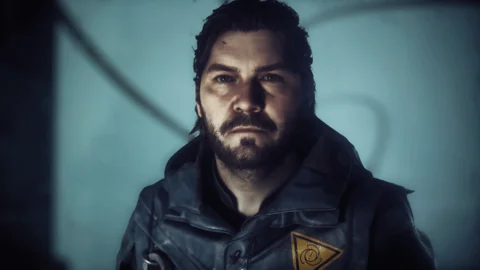
Dylan Faden
Who is Dylan Faden? His Control backstory, role as CONTROL Resonant's playable lead, voice actor Sean Durrie, and the shapeshifting Aberrant weapon.
Light spoilers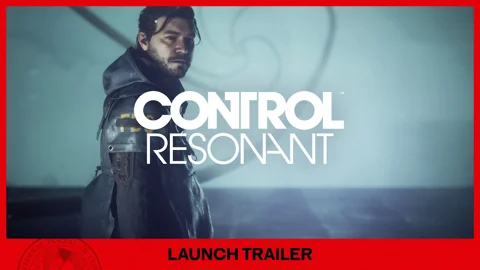
CONTROL Resonant Trailer Song
The Control Resonant launch trailer song is The Cardigans' 'My Favourite Game'. Find trailer music credits, including The Prodigy's 'Omen', and soundtrack details.
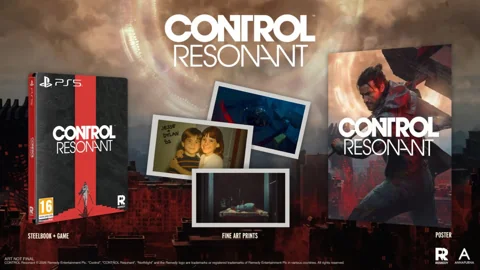
Control Resonant Steelbook Edition
The Control Resonant Steelbook Edition is a $69.99 physical release for PS5 and Xbox Series X, out October 15, 2026. Full contents, retailers and stock.